
Description
Running any of the sample jobs suddenly fails with an error message like
The 'Open-Document' command was found in the module 'powerJobs', but the module could not be loaded.
Cause
This happens when certain errors occur when powerJobs Processor imports its modules. Not all errors lead to this particular message but the following do:
* Some of the scripts in the "Modules" directory are blocked
* The "throw" keyword is executed directly in a module.
Solution
Scripts are blocked
Check the file properties of all files within "C:\ProgramData\coolOrange\powerJobs\Modules". If you see the "[ ] Unblolck" checkbox, check it and press ok.
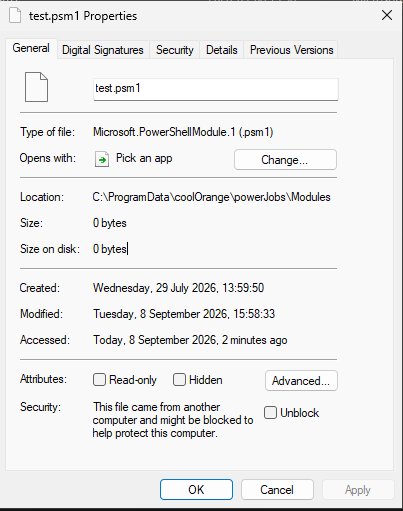
Alternatively you can run the following script in PowerShell
Get-ChildItem -LiteralPath "C:\ProgramData\coolOrange\powerJobs\Modules" -Recurse -File | Unblock-File
Errors are thrown in modules
When errors are thrown in your modules it is not that straight forward. To find out if this is the issue do this:
* Rename "C:\ProgramData\coolOrange\powerJobs\Modules" to "C:\ProgramData\coolOrange\powerJobs\Modules-bak"
* Run the powerJobs Processor installer and repair the installation
* run the Sample.CreatePDF job
If the job runs without the error it means that a terminating error is thrown somewhere in your custom modules. Contact the developer who made them.