
Description
When powerGateServer runs on a system without internet access the powerGateService takes a long time to start and then fails with
Error 1053: The service did not respond to the start or control request in a timely fashion
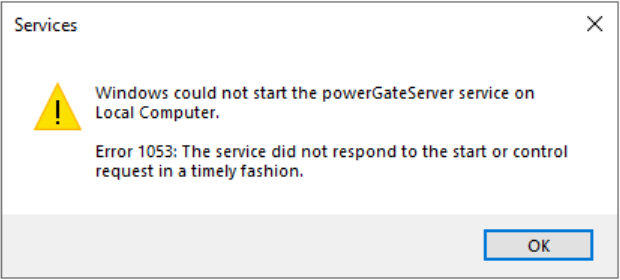
When running the powerGateServer console it takes a long time to start, but then works normally.
Cause
This can happen if the machine was without internet access long enough for the powerGateServer certificate to expire.
When the certificates are valid the machine might be configured to check for certificate revocations, which is not possible without internet access.
Solution
Check the powerGateServer certificate validity
* Right click "C:\Program Files\coolOrange\powerGateServer\powerGateServer.exe"
* Open Properties
* Select "Digital Signatures" tab and for "COOLORANGE" certificate open "Details"
* In "General" tab select "View Certificate"
* Check the "Valid to" date
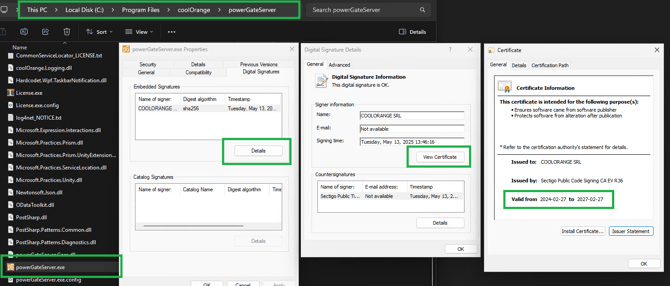
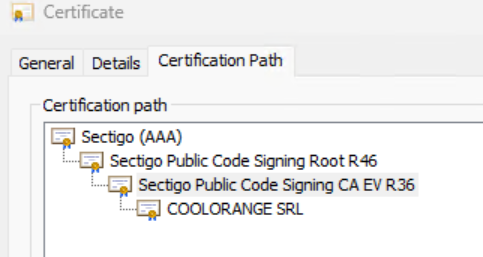
If the certificate is outdated your IT needs to update the trusted root certificates. It is necessary to trust every certificate in the chain
Ensure the machine doesn't check for certificate revocations
If the certificates are valid the issue is probably caused by certificate revocation checks. Open the Internet Properties -> Advanced tab. Make sure "Check for publisher's certificate revocation" is unchecked.
-png.png?width=609&height=803&name=image%20(1)-png.png)
If powerGateServer service runs as "Local System" the setting might have been overridden in the regsitry. You should be able to find it here:
Computer\HKEY_USERS\S-1-5-18\Software\Microsoft\Windows\CurrentVersion\WinTrust\Trust Providers\Software Publishing
See Also
* Sectigo-Intermediate-Certificates(Sectigo)